Check the Academic Calendar
Check the Academic Calendar for important registration dates.
Fall Priority Registration April 14 - July 20 COMPLETED
Fall Late Registration July 27 - August 12
Contact Enrollment Support
Tech Support is here to help with school-related technology issues.
For questions about registering for classes, your enrollment advising team can assist you.
Dual Enrollment students please Contact the Office of Dual Enrollment
DualEnrollment@GwinnettTech.edu | 678-226-6889
Take a look at the information and links below, you may find the answers you need.
Register for Classes | Detailed step-by-step Registration Instructions
Please visit the Enrollment Advisement Services page for more information.
The Registration Lab Schedule can be found on the Enrollment Advisement Services page
Follow these Detailed step-by-step Registration Instructions
1.Follow the Student Dashboard log in instructions to get logged into the student dashboard page www.GwinnettTech.edu/Dashboard
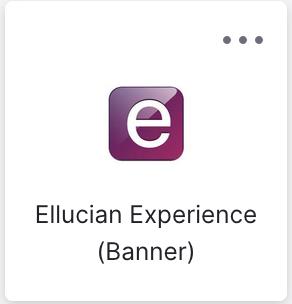
2.Select Ellucian Experience (Banner)
4. Look for the Registration tile.
You may need to click the right or left arrows in the bottom corners of the tile to find the semester you are trying to register for.
Please Note:If you don't see a registration tile, it is because your application is not yet complete.
Contact Student Recruitment for questions about completing your application GTCRecruitment@GwinnettTech.edu | (678) 226-6751
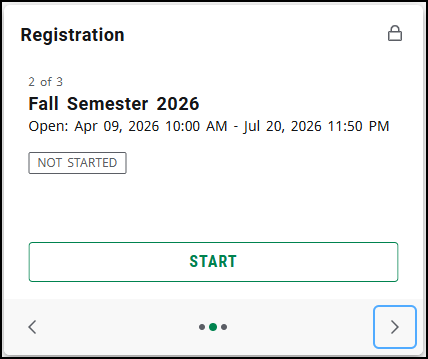
Click the START button if you see one.
.
If you see the message "Unfortunately, you cannot register for this Term." click View Details to find out why.
Contact your enrollment advising team if you have questions.
.
Follow the detailed step-by-step Registration Instructions found on the Register for Classes page
5. Select the appropriate Term and the top left, then click "Add Course" at the bottom right
6. Click on the filter icon at the top right to open filter options. Here you can search by:
- a. Campus Location: Lawrenceville, Alpharetta, Online
- b. Part of Term: "Full Term A, Mini-Mester B, Mini-Mester C" and more
7. In the Search box, type in the entire course code (Example: ENGL 1101) then hit Enter on the keyboard
8. The course will populate, then click on the drop down arrow to see all available courses being taught (Clicking "TCSG Connect" at the bottom of the list will show additional course options.
9. To Register, choose the desired course by clicking the Plus "+" button to the right of the Search Courses window
10. The course will be added to the Summary window, however this has not finalized your registration
11. Once the class has been added, within the Search Courses window, click the "X" at the top right to close that section
12. Click the green Register button at the bottom right, then Confirm button on the pop up window to finalize registration for the class
Contact your enrollment advising team if you have questions.
Check the Academic Calendar
Check the Academic Calendar for important registration dates.
Summer 2026 Academic Calendar / Fall 2026 Academic Calendar
Visit the Enrollment Advisement Services page to view the Open Registration Lab Schedule
.
Registration errors
If you are getting a registration error follow the instructions below.
What do the "NR," "SR" or "C" codes mean in Banner Web Registration?
.
Contact Enrollment Support
If after reading the information below, and watching the instructional videos, you need further assistance, please contact your Enrollment advisor using the link below.
How do I contact my enrollment advisor?
.
Dual Enrollment students
Dual Enrollment students please Contact the Office of Dual Enrollment
CLICK HERE for more information about the Office of Dual Enrollment
DualEnrollment@GwinnettTech.edu
678-226-6889
Contact your Enrollment Advisor
Please visit the Enrollment Advisement Services page for more information.
Here is their contact information, depending on your program of study.
Healthcare Sciences - HealthTeam@GwinnettTech.edu
Computer Sciences - CISTeam@GwinnettTech.edu
Business Sciences - BusinessTeam@GwinnettTech.edu
Engineering/Manufacturing/Construction/Trades - ECMDTeam@GwinnettTech.edu
Public and Professional Services - PPS-Team@GwinnettTech.edu
Alpharetta-North Fulton Students - EnrollmentSupportCenter@GwinnettTech.edu
Use the Qless app
You can also make an appointment to speak with an advisor by phone or in person using the Qless app
https://gwinnetttech.edu/qless
.
REGISTRATION LAB SCHEDULE
Please visit the Enrollment Advisement Services page to view the open registration lab schedule.
Need course advisement?
Please visit the Enrollment Advisement Services page for more information.
For help adding, swapping, dropping classes come to the
registration lab.
Check your time ticket for date & time of registration, which can be found on your Student Banner underneath the Registration tab.
Check the Academic Calendar for important registration dates.
Fall Priority Registration April 14 - July 20 COMPLETED
Fall Late Registration July 27 - August 10
.
If you need tech support with anything else, please contact the student IT help desk again.
Thank you
Student IT Help Desk
Stuhelpdesk@gwinnetttech.edu | 678-226-6407
https://gwinnetttech.edu/helpdesk
Frequently asked questions can also be found on our webpage.