Tech Support is here to help with school-related technology issues.
For questions about registering for classes, your enrollment advising team can assist you.
There are several issues that may come up and prevent a student from registering for classes that are not a Tech Support issue.
Register for classes
To register for classes, follow the detailed step-by-step instruction found on the Register for Classes page
Students will need to log on to the student dashboard page, and open the Ellucian experience banner app.
You should then see a registration tile for the semester you wish to register for:
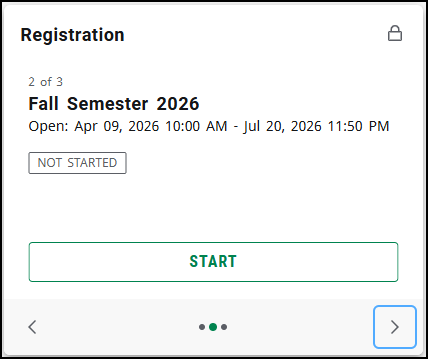
You may need to click the right or left arrows in the bottom corners of the tile to find the semester you are trying to register for.
Where is the registration tile?
If you don't see a registration tile, it means the registration tile in banner has not been enabled yet on your account.
This is because your student application is not yet complete.
Contact the Student Recruitment Center for help completing your application.
GTCRecruitment@GwinnettTech.edu | (678) 226-6751.
.
Check your application status
To check your application status you will need to log in on the Application and Acceptance Portal with your personal email address and the password you created.
https://mygwinnetttech.force.com/apply/
Or use one of the green Apply Now buttons on the Gwinnett Tech home page

How do I check my application Status?
.
Contact Student Recruitment
For questions about applying to the college, including password resets for the Application and Acceptance Portal, please contact the Student Recruitment Center.
via email: GTCRecruitment@GwinnettTech.edu or via phone: (678) 226-6751.
Dual Enrollment students
Dual Enrollment students please Contact the Office of Dual Enrollment - https://gwinnetttech.edu/dualenrollment
DualEnrollment@GwinnettTech.edu | 678-226-6889
.
If you need tech support with anything else please let us know.
You can send us a message, give us a call, or come see us in person in the front lobby in building 100 on the Lawrenceville campus.
Tech Support desk on campus, hours and location
Thank you
Student Tech Support
Stuhelpdesk@gwinnetttech.edu | 678-226-6407
https://gwinnetttech.edu/helpdesk
Frequently asked questions can also be found on our webpage.