Contact the Bursars Office for questions about refunds. | 470-448-1212 | Bursar@GwinnettTech.edu
If your Bank Mobile account may have been compromised call the Bank Mobile security line at 1-866-309-7454 to report possible fraudulent activity
Key Points
- Official messages from Bankmobile will use bankmobilewebemail.com@mailman.bankmobilewebemail.com as the sender.
- refundselection.com is the official bankmobile website.
- The Bursar's Office sends students emails and text messages letting them know to expect an email message from BankMobile.
- Be careful of spoofed message from legit emails, look for the "we can't verify this message" warning
- Contact the Bursars Office for question about refunds 470-448-1212, Bursar@GwinnettTech.edu
Please read information below for further details
Please read all details below carefully
Bankmobile is the servicer the school uses to send out refunds.
Students who are due a refund will get messages from the Bursar letting them know to expect messages from BankMobile.
Bankmobile does send messages to students who are due a refund from Gwinnett Tech.
We have recently seen some copycat fake bankmobile messages also.
The sender is impersonating Gwinnett Technical College and using branding that closely resembles legitimate communications to deceive students.
Some messages are using surveys@gwinnetttech.edu, the bookstore eFollett email address, the okta support email address, blackboard support, bankmobile, as well as other legitimate email addresses.
For question about payments and refunds please Contact the Bursars Office 470-448-1212, Bursar@GwinnettTech.edu
Look at the examples below for how to tell the difference. If you are not sure, please ask Stuhelpdesk@gwinnetttech.edu | 678-226-6407
Be on the lookout for fake messages
We have recently seen some copycat fake bankmobile messages.
The sender is impersonating Gwinnett Technical College and using branding that closely resembles legitimate communications to deceive students.
Look closely at the example below.
Hover over the link in the message, do not click on the link, you will see the link goes to a Google form rather than the BankMobile website. Do not click on the link. The fake google form is made to look like the BankMobile site to try and get students to reveal sensitive information.
If you see a warning message letting you know "it might not be safe to respond" do not respond to the message.
Never give out your password or banking information on a google form
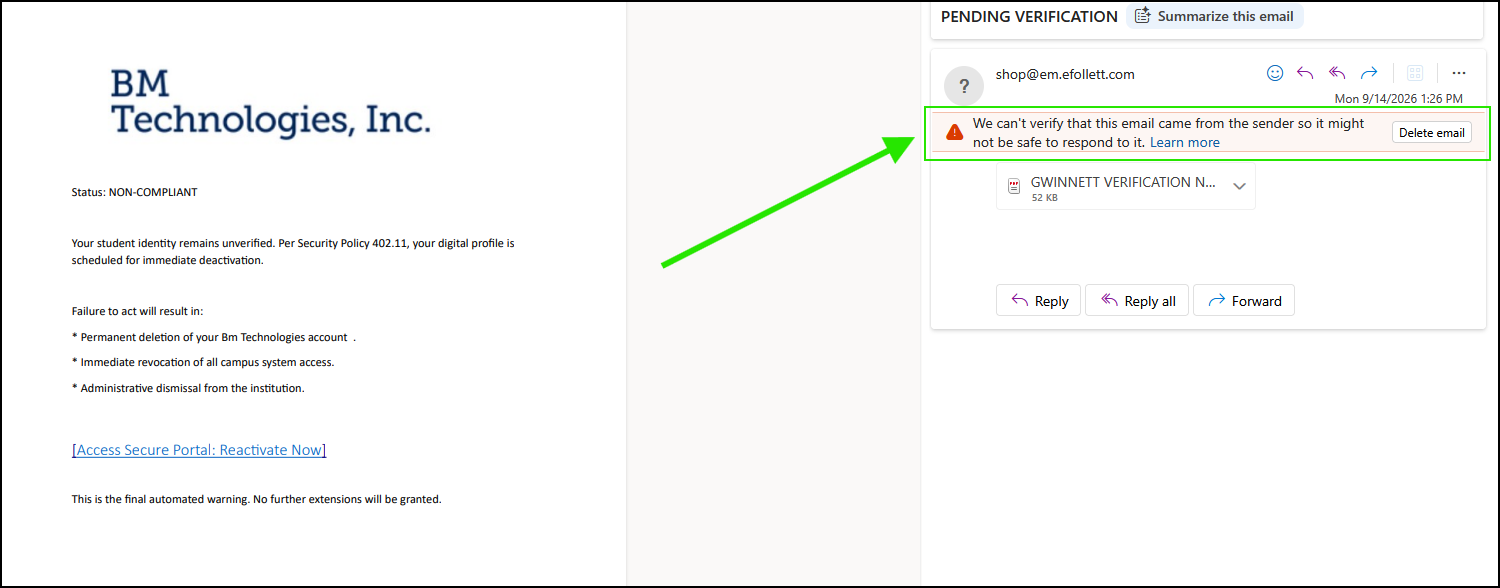
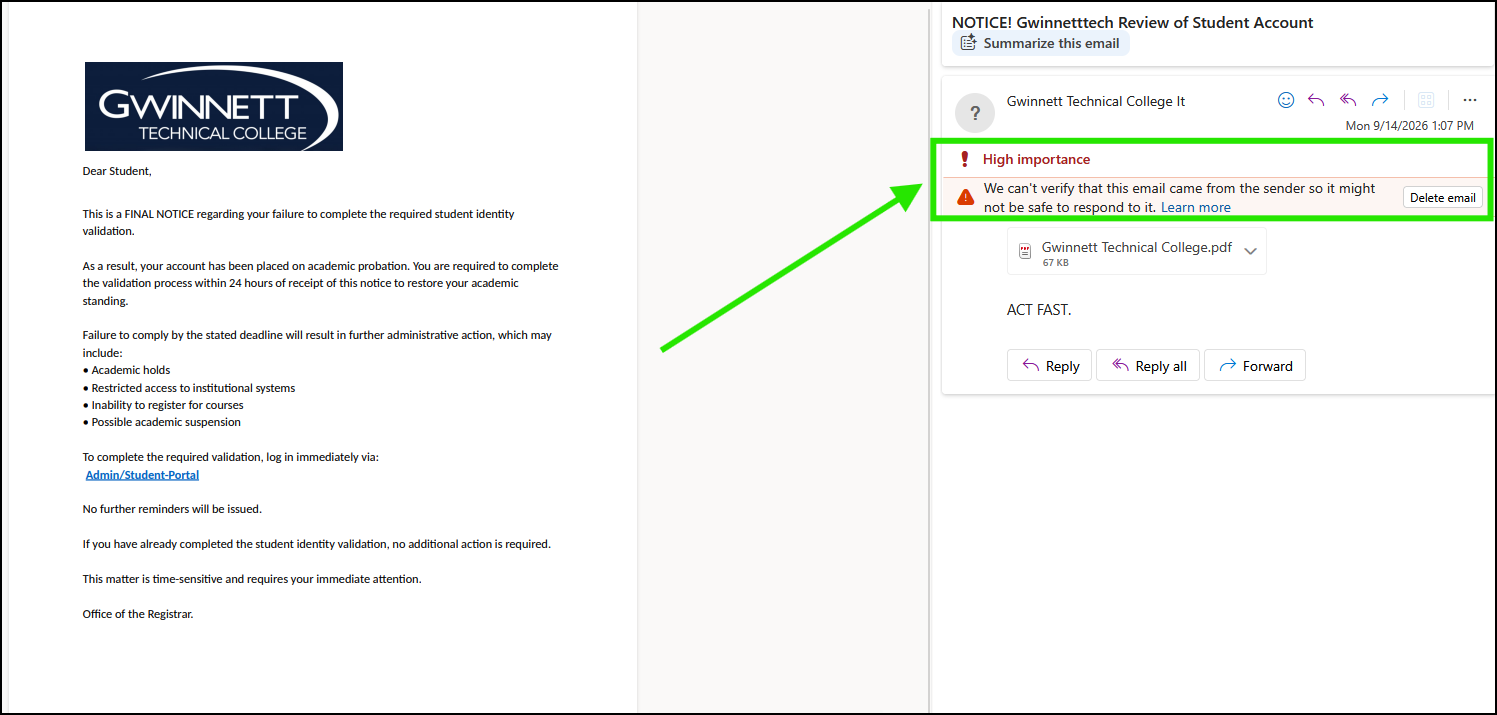
Check the sender

If you see this warning messages it means something is not right about the email you have received
Scammers are spoofing a legitimate email addresses.
We have seen messages using surveys@gwinnetttech.edu, the bookstore eFollett email address, the okta support email address, blackboard support, bankmobile, as well as other legitimate email addresses.
Official messages from Bankmobile will use bankmobilewebemail.com@mailman.bankmobilewebemail.com as the sender.
The message could also come from a compromised student email account @student.gwinnetttech.edu. Messages sent from compromised student accounts have been reduced by our recent security steps but it does sometimes happen.
Sometimes the messages come from an Outlook, Gmail, Yahoo or another free email account, those messages are fake.
That doesn't look right, Look for Red Flags
Any message that asks you to respond right away with threats of something bad happening is something to watch out for. These types of messages play on a sense of urgency to get you to act quickly without thinking. Slow down and look at the message carefully.
If you see a message that seems a bit off be suspicious of that. Pay attention to red flags that point towards a message that could be fake. Ask Copilot. Is this a phishing message? Is this message safe?
.
Suspicious email question
If you are ever unsure about a message please ask us. Stuhelpdesk@gwinnetttech.edu | 678-226-6407
We would much rather you report a message than fall victim to a scam.
BankMobile Disbursements
Bankmobile is the vendor Gwinnett Tech uses to send refunds to students, beware of copycat scam messages.
Am I due a refund? Check your student email
Students who are due a refund will receive an email from the Bursar's Office to their student email address ahead of time letting them know to expect an email message from BankMobile.
The Bursar's Office also sends students a text message letting them know to expect an email message from BankMobile.
Check your student email often so you don't miss any messages.
Please look at the message details at the link so you know what to look for in case you receive a message from BankMobile. Real Email from BankMobile, not a scam
We are here to help if students have questions about suspicious emails.
Stuhelpdesk@gwinnetttech.edu | 678-226-6407
Questions about refunds
For question about payments and refunds please Contact the Bursars Office
470-448-1212, Bursar@GwinnettTech.edu
Report suspicious messages
If you are ever unsure about a message please ask us. Stuhelpdesk@gwinnetttech.edu | 678-226-6407
We would much rather you report a message than fall victim to a scam.
REPORT A SUSPICIOUS MESSAGE | BACK TO PHISH BOWL
If you need tech support with anything else please let us know.
You can send us a message, give us a call, or come see us in person in the front lobby in building 100 on the Lawrenceville campus.
Thank you
Student IT Help Desk
Stuhelpdesk@gwinnetttech.edu | 678-226-6407
https://gwinnetttech.edu/helpdesk
Frequently asked questions can also be found on our webpage.